

Artificial Intelligence (AI) tools like Microsoft Copilot are transforming the way we work—helping us write faster, analyze data more efficiently, and automate everyday tasks. As adoption grows, many employees are already exploring these tools to boost productivity.
However, with this opportunity comes responsibility. Not all AI tools offer the same level of security and using them incorrectly—especially with company data—can introduce significant risks.
This article outlines how to safely use Microsoft Copilot, highlights the risks of free AI tools (including the free Copilot app), and shares best practices to protect organizational data.
📈 The Rise of AI in the Workplace
Across industries, employees are increasingly experimenting with AI tools—often starting with free, publicly available platforms. This includes tools like:
- Free ChatGPT versions
- Personal AI applications
- The free Copilot app on Windows
While these tools are powerful and accessible, they are not always designed for enterprise use. When sensitive or confidential information is entered into these platforms, there is a risk that it may leave the organization’s secure environment.
⚠️ Understanding the Risk: Free Copilot App & Public AI Tools
One of the most common misconceptions is that all AI tools from trusted providers offer the same level of protection.
Important clarification:
🔴 The free Copilot app (including Windows Copilot without a work account) does not provide enterprise data protection.
This means:
- Data entered may not be confined within your organization
- Prompts and responses may not be governed by enterprise security controls
- Sensitive business information could be exposed
👉 As a result, these tools should not be used for any company-related or confidential information, unless explicitly approved by your IT team.
✅ The Safe Alternative: Microsoft 365 Copilot
For work purposes, Microsoft provides enterprise-grade AI tools designed with security in mind:
✔ Microsoft 365 Copilot
✔ Microsoft 365 Copilot Chat (signed in with a work account)
When used correctly within a corporate environment, these tools provide Enterprise Data Protection (EDP).
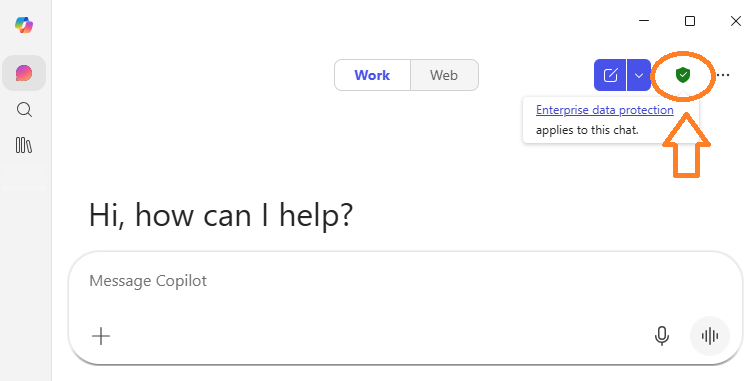
🔒 What does this mean?
- Your data remains inside your organization’s tenant
- Prompts and responses are not used to train AI models
- Information is protected under Microsoft’s Data Protection Agreements (DPA)
- Data is encrypted and securely managed
In other words, you get the benefits of AI—without compromising security.
🟢 🟡 🔴 Choosing the Right Tool
To simplify decision-making, here’s a quick guide:
🟢 Recommended (Safest)
- Microsoft 365 Copilot (corporate environment)
- Microsoft 365 Copilot Chat (Entra ID login)
🟡 Use with Caution
- Free Copilot app (for non-sensitive, general queries only)
🔴 Not Allowed
- Free Copilot app for company data
- Public AI tools (ChatGPT free, personal AI accounts, etc.)
- Any unapproved AI platforms
⚙️ Best Practices for Employees
To ensure safe and responsible AI usage:
- ✅ Always sign in with your work account
- ✅ Use only approved Copilot tools
- ✅ Access AI tools through secure work environments
- ❌ Do not paste confidential, financial, customer, or internal data into public tools
- ❌ Avoid mixing personal AI usage with business tasks
🔐 A Shared Responsibility: Technology + User Behavior
Even with enterprise-grade tools, security is not automatic.
Important reminder:
Copilot does NOT override permissions.
If data is over-shared in systems like:
- SharePoint
- Microsoft Teams
- OneDrive
Copilot may surface that information to users who already have access.
What this means:
- Be mindful of what you upload and share
- Apply proper data classification and sensitivity labels
- Follow your organization’s security policies
📌 Key Takeaways
- ✅ Use Microsoft 365 Copilot only for work-related tasks
- 🚫 Avoid using the free Copilot app for company or sensitive data
- 🔒 Ensure data stays within enterprise-protected environments
- 👥 Remember that security depends on both systems and users
🚀 Moving Forward with Confidence
AI is a powerful tool that can unlock new levels of productivity—but only when used responsibly. By choosing the right tools and following best practices, we can safely embrace innovation while protecting what matters most: our data.
If you need help accessing Microsoft 365 Copilot or have questions about safe AI usage, please contact your IT support team.
You must be logged in to post a comment.